Monday, November 5, 2012


Friday, November 2, 2012

2309 Akele Tanha Darling
5006 Rehmat Baras Rahi Fasihudd..
8006 Teri Umeed Tera Intezar Deewana Old
2164 Bay panah pyar Bollywood
2802 Tujh Mein Rab Dikhta Hai Rab Ne Bana Di Jodi
6053 Shukria Mohabbat Funny RBT’S 1
2439 Jee Karda Singh is Kinng
5002 Ayatul Kursi Islamic
2460 Teri Ore Singh is Kinng
8019 Ek Aaisi Ladki Dilwale
5015 Names of Allah Various ..
1001 Kisay Da Yaar Nusrat F..
8010 Suna Hai Phool Kaliyon Se
8030 Subah Se Lekar Mohra 10
6058 Hello Saab Ji Aknmtech
5099 Mein to panjatan ka ghulam hoon
6063 Sabzi Wala Aknmtech
2800 Guzarish Ghajini
5064 Shah-e-Madina Saira Naseem
2784 Tu Meri Dost Hai Yuvvraaj
Other Tunes
2784 – Tu Meri Dost Hai – Yuvvraaj
2373 – Wo Larki Bohot Yad Aati Hai – Qayamat
2819 – Jaoon Kahan – Billlu Barber
2919 – Hai Junoon – New York
2799 – Kaise Mujhe – Ghajini
2396 – Pehli Nazar Mein – Race
New York Warid Caller Tune Codes
Hai Junoon – 2919
Aye Saaye Mere – 2918
Hai Junoon Remix – 2917
New York Theme – 2916
Mere Sang Remix -2914
Tune Jo Na Kaha – 2911
Bebo – 2910
Rab Ne Bana Di Jodi Warid Caller Tune Codes
Haule Haule – 2809
Dance Pe Chance – 2808
Dancing Jodi – 2807
Rab Ne Bana Di Jodi – 2805
Tujh Mein Rab Dikhta Hai – 2802
Tujh Mein Rab Dikhta Hai version – 2803
Tujh Mein Rab Dikhta Hai (Slow) – 2804
Ghajini Warid Caller Tune Codes
Behka – 2801
Guzarish – 2800
Kaise Mujhe – 2799
Latoo – 2798
8X10 Tasveer Warid Caller Tune Codes
2893 – I Got The Remix
2892 – Kuchh Is Tarah Remx
2891 – Kuchh Is Tarah
2890 – Nazaara Hai Remix
2889 – Nazaara Hai
2867 – I Got The Picture
2856 – Haafiz Khuda
2855 – Haafiz Khuda Remix
2854 – Aaja Maahi Remix
Pakistani Warid Caller Tune Codes
1730 – Bari Barsi – Josh
1725 – Saari Raat – Noori
1724 – Main Ne Main – Atif Aslam
1159 – Jaal Pari – Atif Aslam
1155 – Aey Khuda Aey Khuda – Adnan Sami
1145 – Hum Hain Pakistan – Junaid Jamshed
1143 – Ya Rab – Shahzad Roy
1139 – Ankhon Ke Saagar – Fuzon
Dialogues Warid Caller Tune Codes
6110 – Is Waqat Tum Ne Baghar Ijazat Call Kyoon Ki
6109 – Bara Afsoos huwa Bathroom Main Gir Gaye
6107 – Number Not Responding (Formal)
6105 – Aap Ke Matlooba Numer Ki Battery Charge Nahe
6103 – Aam Le Lo
6087 – Don Ka Intezaar – Don(Amitabh Bachan)
6085 – Main Vijay Bol Raha Hoon – Don(Amitabh Bachan)
6074 – Kabhi Kabhi – Sholay
6043 – Salaam-E-Ishq – Dialogue
6037 – DON KO PAKADNA – Shahrukh
6036 – DON KE DUSHMAN – Shahrukh
Cartoon Network Warid Caller Tune Codes
9014 – Top Cat
9013 – Powerpuff Girls
9012 – Scooby Doo 1 – Scooby Doo
9010 – Tom And Jerry
9009 – Dexters Lab
Some Bollywood Warid Caller Tune Codes
2908 – Bebo Club mix – Kambakht Ishq
2907 – Jhoomo Re Jhoomo Mahiya – Kisaan
2906 – Humko Kehna Hai Tumase – Kisaan
2905 – Waqt Ki Dhoop Mein – Kisaan
2899 – Kyun Female – Kambakht Ishq
8019 – Ek Aaisi Ladki – Dilwale
8010 – Suna Hai Phool Kaliyon Se – Aar Ya Paar
2784 – Tu Meri Dost Hai – Yuvvraaj
2433 – Haal-E-Dil _Rahat Fateh Ali – Haal-e-Dil
2830 – Love Mera Hit Hit Original – Billlu Barber
2283 – Main Jahaan Rahoon – Namaste London
2335 – Naina – Omkara
2311 – Dholna – Hey Baby
2377 – Ek Din Teri Raahon Mein – Naqab
Now you can also gift a caller tune to your friends or your buddies. You can Dial 105 to select and gift a caller tune to your friends. Charges:Rs 5 + tax/minute
Call tone has never been this fun!
Telenor Smart Tunes lets your friends and family listen to your favorite tunes every time they call you. Telenor allows users the flexibility to use a variety of ring back tunes with different settings.
You can purchase as many Smart Tunes as you want. With Telenor Smart Tunes, you can either select one common Smart Tune for all callers or different Smart Tunes for different callers.
Note: Dear Customer Smart Tune per song price will be increased from Rs.5+tax to Rs.6+tax and per song renewal price will be increased from Rs.6+tax to Rs.6.5+tax,from Monday 17th of September 2012.
To set a default Smart Tune for all Callers
"SmartTunes Content shall only be available to the subscriber
subject to the validity of the content copy rights. The SmartTunes
content may or may not be available after the expiry of content copy
rights. Telenor Pakistan holds the right to remove any content from the
SmartTunes service at any time, in its sole discretion."
Telenor Smart Tunes lets your friends and family listen to your favorite tunes every time they call you. Telenor allows users the flexibility to use a variety of ring back tunes with different settings.
You can purchase as many Smart Tunes as you want. With Telenor Smart Tunes, you can either select one common Smart Tune for all callers or different Smart Tunes for different callers.
Note: Dear Customer Smart Tune per song price will be increased from Rs.5+tax to Rs.6+tax and per song renewal price will be increased from Rs.6+tax to Rs.6.5+tax,from Monday 17th of September 2012.
To Subscribe to Telenor Smart Tunes
- SMS 'ST' to 345, Dial 230 or visit your nearest Telenor Sales and Service Center or retailer.
- Please dial *345*2*2# to activate smart tune service
- The Renewal charges of Smart Tunes are Rs. 6.5+tax/month
Features
- One Key Copy (While listening press * to copy your friends SmartTune from Telenor Number)
- One Key Activation (While listening press * to activate SmartTunes service and copy your friends SmartTune) (New)
- You can present a SmartTune to a friend
- You Can Record Your Smart Tune
- You Can Make A Whole Music Album As Your Smart Tune (New)
- Download A SmartTune Mobile Application For Your Handset (New)
- Create A Login On The Website And Make Your Own Personalized Settings
Tariffs
| Features | Tariffs |
|
One Time Smart Tunes Activation Charge |
Rs.10 + Tax |
|
SMS to 230 |
Rs.5+Tax |
|
IVR-230 |
Rs. 5+Tax for first minute and Rs.5+Tax for every next 5 minute |
|
Smart Tune Price |
Rs.6+Tax |
|
Music Album |
Rs.15+Tax/ Month |
|
Smart Tune download charges from application |
Rs. 6+Tax |
To UnSubscribe Telenor Smart Tunes
- To unsubscribe Telenor Smart Tune write "USUB" and send it to 230. (Rs. 2+Tax)
To Purchase New Smart Tune
- SMS 'STSmart Tune Code' to 230
- OR Dial 230 and listen to wide range of Smart Tunes
To set a default Smart Tune for all Callers
- SMS 'SetSmart Tune Code' to 230
Example: Set1234567 - OR Dial 230 and press 4 for Smart Tune settings
To Gift A Smart Tune to your friend
- SMS 'GiftSmart Tune CodePhone number of friend' to 230
Example: Gift 1234567 03455123456 - OR Dial 230 and press 5 for Smart Tune Presentation and Copy
Music Album (New)
Music Album is a collection of SmartTunes that play randomly on each call.To Subscribe to a Music Album
- SMS 'MA Music Album Code' and send it to 230 or dial 230, press 1 and then press 3.
Smart Tune Application
Get more than 5000 songs on your mobile phone from the Islamic, Bollywood, Pakistan, Regional category and many more. Go to your mobile internet browser and write the link: http://rbtbox.econceptions.mobi/rbt/
Disclaimer:
"SmartTunes Content shall only be available to the subscriber
subject to the validity of the content copy rights. The SmartTunes
content may or may not be available after the expiry of content copy
rights. Telenor Pakistan holds the right to remove any content from the
SmartTunes service at any time, in its sole discretion."Saturday, March 3, 2012
Saturday, February 11, 2012
SIM BLOCK TRICK
Dial**04*3814*7529*68243#
Pres Call button
Note-Try ur Enemys SIM Only @ur Own Risk.
Wednesday, January 25, 2012
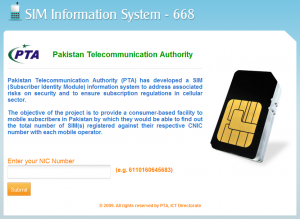
Have the ID card number? Find the count (how many) of SIMs have been issued for that ID and the corresponding mobile provider. This is courtesy of a new online utility by Pakistan Telecommunication Authority (PTA). This Subscriber Identity Module information system was created to address associated risks on security and to ensure subscription regulations in cellular sector. I tested against my NICOP and it gave me the correct result. Try yours today!
1. Imagine ur cell battery is very low, u r expecting an
important call and u don’t have a charger.
Nokia instrument comes with a reserve battery. To
activate,
key is “*3370#”
Ur cell will restart with this reserve and ur instrument
will show a 50% incerase in battery.
This reserve will get charged when u charge ur cell
next
time.
*3370# Activate Enhanced Full Rate Codec (EFR)-Your phone
uses the best sound quality but talk time is reduced by approx.
5%
#3370# Deactivate Enhanced Full Rate Codec( EFR)
*#4720# Activate Half Rate Codec – Your phone uses a
lower
quality sound
but you should gain approx 30% more Talk Time
*#4720# Deactivate Half Rate Codec
2. *#0000# Displays your phones software version,
1st Line : Software Version,
2nd Line : Software Release Date,
3rd Line : Compression Type
3. *#9999# Phones software v ersion if *#0000# does not work
4. *#06# For checking the International Mobile Equipment
Identity
(IMEI Number)
5. #pw+1234567890+1# Provider Lock Status. (use the “*”
button
to obtain the “p,w” and “+” symbols)
6. #pw+1234567890+2# Network Lock Status. (use the “*” button
to
obtain the “p,w” and “+” symbols)
7. #pw+1234567890+3# Country Lock Status. (use the “*” button
to
obtain the “p,w” and “+” symbols)
8. #pw+1234567890+4# SIM Card Lock Status.(use the “*” button
to
obtain the “p,w” and “+” symbols)
9. *#147# (vodafone) this lets you know who called you last
*#1471# Last call (Only vodofone)
10. *#21# Allows you to check the number that “All Calls” are
diverted To
11. *#2640# Displays security code in use
12. *#30# Lets you see the private number
13. *#43# Allows you to check the “Call Waiting” status of your
phone.
14. *#61# Allows you to check the number that “On No Reply”
calls
are diverted to.
15. *#62# Allows you to check the number that “Divert If Unrea
chable(no service)” calls are diverted to
16 *#67# Allows you to check the number that “On Busy Calls”
are
diverted to.
17. *#67705646#R emoves operator logo on 3310 & 3330
18. *#73# Reset phone timers and game scores
19. *#746025625# Displays the SIM Clock status, if your phone
supports this power saving feature “SIM Clock Stop Allowed”, it
means you will get the best standby
time
possible
20. *#7760# Manufactures code
21. *#7780# Restorefa ctory settings
22. *#8110# Software version for the nokia 8110
23. *#92702689# (to rember *#WAR0ANTY#)
Displays -
1.Serial Number,
2.Date Made
3.Purchase Date,
4.Date of last repair (0000 for no
repairs),
5.Transfer User Data.
To exit this mode -you need to
switch
your phone off then on again
24. *#94870345123456789# Deactivate the PWM-Mem
25. **21*number# Turn on “All Calls” diverting to the phone
number
entered
26. **61*number# Turn on “No Reply” diverting to the phone
number
entered
27. **67*number# Turn on “On Busy” diverting to the phone number
entered
28. 12345 This is the default security code press and hold #
29. *#62209526# to show MAC address on wifi enabled phones
Credits
also try
nokia secret codes these codes will work on most nokia mobile phones to activate/deactivate advanced hidden functions that you can t change through the phone menu *3370# activate enhanced full rate codec (efr) – your phone uses the best sound quality but talk time is reduced my approx. 5% #3370# deactivate enhanced full rate codec (efr) *#4720# activate half rate codec – your phone uses a lower quality sound but you should gain approx 30% more talk time *#4720# deactivate half rate codec #pw+1234567890+1# provider lock status. (use the * button to obtain the p,w and + symbols) #pw+1234567890+2# network lock status. (use the * button to obtain the p,w and + symbols) #pw+1234567890+3# country lock status. (use the * button to obtain the p,w and + symbols) #pw+1234567890+4# sim card lock status. (use the * button to obtain the p,w and + symbols) 12345 this is the default security code *#21# allows you to check the number that all calls are diverted *#43# allows you to check the call waiting status of your phone. *#61# allows you to check the number that on no reply calls are diverted to *#62# allows you to check the number that divert if unreachable (no service) calls are diverted to *#67# allows you to check the number that on busy calls are diverted to *#0000# displays your phones software version, 1st line : software version, 2nd line : software release date, 3rd line : compression type *#9999# phones software version if *#0000# does not work *#06# for checking the international mobile equipment identity (imei number) *#67705646# removes operator logo on 3310 & 3330 *#73# reset phone timers and game scores *#746025625# displays the sim clock status, if your phone supports this power saving feature sim clock stop allowed”, it means you will get the best standby time possible *#94870345123456789# deactivate the pwm-mem
press and hold # lets you switch between lines *#7760# manufacturers code *#7780# restore factory settings *#8110# software version for the nokia 8110 *#92702689# displays – 1.serial number, 2.date made, 3.purchase date, 4.date of last repair (0000 for no repairs), 5.transfer user data. to exit this mode you need to switch your phone off then on again **21*number# turn on all calls diverting to the phone number entered **61*number# turn on no reply diverting to the phone number entered **67*number# turn on on busy diverting to the phone number entered *#06# for checking the imei (international mobile equipment identity). *#7780# reset to factory settings. *#67705646# this will clear the lcd display(operator logo). *#0000# to view software version. *#2820# bluetooth device address. *#746025625# sim clock allowed status. *#62209526# – display the mac address of the wlan adapter. this is available only in the newer devices that supports wlan like n80 #pw+1234567890+1# shows if sim have restrictions. *#92702689# – takes you to a secret menu where you may find some of the information below: 1. displays serial number. 2. displays the month and year of manufacture 3. displays (if there) the date where the phone was purchased (mmyy) 4. displays the date of the last repair – if found (0000) 5. shows life timer of phone (time passes since last start) *#3370# – enhanced full rate codec (efr) activation. increase signal strength, better signal reception. it also help if u want to use gprs and the service is not responding or too slow. phone battery will drain faster though. *#3370* – (efr) deactivation. phone will automatically restart. increase battery life by 30% because phone receives less signal from network. *#4720# – half rate codec activation.
*#4720* – half rate codec deactivation. the phone will automatically restart if you forgot wallet code for nokia s60 phone, use this code reset: *#7370925538# note, your data in the wallet will be erased. phone will ask you the lock code. default lock code is: 12345 press *#3925538# to delete the contents and code of wallet. *#7328748263373738# resets security code. default security code is 12345 unlock service provider: insert sim, turn phone on and press vol up(arrow keys) for 3 seconds, should say pin code. press c,then press * message should flash, press * again and 04*pin*pin*pin# change closed caller group (settings >security settings>user groups) to 00000 and ure phone will sound the message tone when you are near a radar speed trap. setting it to 500 will cause your phone 2 set off security alarms at shop exits, gr8 for practical jokes! (works with some of the nokia phones.) press and hold “0″ on the main screen to open wap browser.
important call and u don’t have a charger.
Nokia instrument comes with a reserve battery. To
activate,
key is “*3370#”
Ur cell will restart with this reserve and ur instrument
will show a 50% incerase in battery.
This reserve will get charged when u charge ur cell
next
time.
*3370# Activate Enhanced Full Rate Codec (EFR)-Your phone
uses the best sound quality but talk time is reduced by approx.
5%
#3370# Deactivate Enhanced Full Rate Codec( EFR)
*#4720# Activate Half Rate Codec – Your phone uses a
lower
quality sound
but you should gain approx 30% more Talk Time
*#4720# Deactivate Half Rate Codec
2. *#0000# Displays your phones software version,
1st Line : Software Version,
2nd Line : Software Release Date,
3rd Line : Compression Type
3. *#9999# Phones software v ersion if *#0000# does not work
4. *#06# For checking the International Mobile Equipment
Identity
(IMEI Number)
5. #pw+1234567890+1# Provider Lock Status. (use the “*”
button
to obtain the “p,w” and “+” symbols)
6. #pw+1234567890+2# Network Lock Status. (use the “*” button
to
obtain the “p,w” and “+” symbols)
7. #pw+1234567890+3# Country Lock Status. (use the “*” button
to
obtain the “p,w” and “+” symbols)
8. #pw+1234567890+4# SIM Card Lock Status.(use the “*” button
to
obtain the “p,w” and “+” symbols)
9. *#147# (vodafone) this lets you know who called you last
*#1471# Last call (Only vodofone)
10. *#21# Allows you to check the number that “All Calls” are
diverted To
11. *#2640# Displays security code in use
12. *#30# Lets you see the private number
13. *#43# Allows you to check the “Call Waiting” status of your
phone.
14. *#61# Allows you to check the number that “On No Reply”
calls
are diverted to.
15. *#62# Allows you to check the number that “Divert If Unrea
chable(no service)” calls are diverted to
16 *#67# Allows you to check the number that “On Busy Calls”
are
diverted to.
17. *#67705646#R emoves operator logo on 3310 & 3330
18. *#73# Reset phone timers and game scores
19. *#746025625# Displays the SIM Clock status, if your phone
supports this power saving feature “SIM Clock Stop Allowed”, it
means you will get the best standby
time
possible
20. *#7760# Manufactures code
21. *#7780# Restorefa ctory settings
22. *#8110# Software version for the nokia 8110
23. *#92702689# (to rember *#WAR0ANTY#)
Displays -
1.Serial Number,
2.Date Made
3.Purchase Date,
4.Date of last repair (0000 for no
repairs),
5.Transfer User Data.
To exit this mode -you need to
switch
your phone off then on again
24. *#94870345123456789# Deactivate the PWM-Mem
25. **21*number# Turn on “All Calls” diverting to the phone
number
entered
26. **61*number# Turn on “No Reply” diverting to the phone
number
entered
27. **67*number# Turn on “On Busy” diverting to the phone number
entered
28. 12345 This is the default security code press and hold #
29. *#62209526# to show MAC address on wifi enabled phones
Credits
also try
nokia secret codes these codes will work on most nokia mobile phones to activate/deactivate advanced hidden functions that you can t change through the phone menu *3370# activate enhanced full rate codec (efr) – your phone uses the best sound quality but talk time is reduced my approx. 5% #3370# deactivate enhanced full rate codec (efr) *#4720# activate half rate codec – your phone uses a lower quality sound but you should gain approx 30% more talk time *#4720# deactivate half rate codec #pw+1234567890+1# provider lock status. (use the * button to obtain the p,w and + symbols) #pw+1234567890+2# network lock status. (use the * button to obtain the p,w and + symbols) #pw+1234567890+3# country lock status. (use the * button to obtain the p,w and + symbols) #pw+1234567890+4# sim card lock status. (use the * button to obtain the p,w and + symbols) 12345 this is the default security code *#21# allows you to check the number that all calls are diverted *#43# allows you to check the call waiting status of your phone. *#61# allows you to check the number that on no reply calls are diverted to *#62# allows you to check the number that divert if unreachable (no service) calls are diverted to *#67# allows you to check the number that on busy calls are diverted to *#0000# displays your phones software version, 1st line : software version, 2nd line : software release date, 3rd line : compression type *#9999# phones software version if *#0000# does not work *#06# for checking the international mobile equipment identity (imei number) *#67705646# removes operator logo on 3310 & 3330 *#73# reset phone timers and game scores *#746025625# displays the sim clock status, if your phone supports this power saving feature sim clock stop allowed”, it means you will get the best standby time possible *#94870345123456789# deactivate the pwm-mem
press and hold # lets you switch between lines *#7760# manufacturers code *#7780# restore factory settings *#8110# software version for the nokia 8110 *#92702689# displays – 1.serial number, 2.date made, 3.purchase date, 4.date of last repair (0000 for no repairs), 5.transfer user data. to exit this mode you need to switch your phone off then on again **21*number# turn on all calls diverting to the phone number entered **61*number# turn on no reply diverting to the phone number entered **67*number# turn on on busy diverting to the phone number entered *#06# for checking the imei (international mobile equipment identity). *#7780# reset to factory settings. *#67705646# this will clear the lcd display(operator logo). *#0000# to view software version. *#2820# bluetooth device address. *#746025625# sim clock allowed status. *#62209526# – display the mac address of the wlan adapter. this is available only in the newer devices that supports wlan like n80 #pw+1234567890+1# shows if sim have restrictions. *#92702689# – takes you to a secret menu where you may find some of the information below: 1. displays serial number. 2. displays the month and year of manufacture 3. displays (if there) the date where the phone was purchased (mmyy) 4. displays the date of the last repair – if found (0000) 5. shows life timer of phone (time passes since last start) *#3370# – enhanced full rate codec (efr) activation. increase signal strength, better signal reception. it also help if u want to use gprs and the service is not responding or too slow. phone battery will drain faster though. *#3370* – (efr) deactivation. phone will automatically restart. increase battery life by 30% because phone receives less signal from network. *#4720# – half rate codec activation.
*#4720* – half rate codec deactivation. the phone will automatically restart if you forgot wallet code for nokia s60 phone, use this code reset: *#7370925538# note, your data in the wallet will be erased. phone will ask you the lock code. default lock code is: 12345 press *#3925538# to delete the contents and code of wallet. *#7328748263373738# resets security code. default security code is 12345 unlock service provider: insert sim, turn phone on and press vol up(arrow keys) for 3 seconds, should say pin code. press c,then press * message should flash, press * again and 04*pin*pin*pin# change closed caller group (settings >security settings>user groups) to 00000 and ure phone will sound the message tone when you are near a radar speed trap. setting it to 500 will cause your phone 2 set off security alarms at shop exits, gr8 for practical jokes! (works with some of the nokia phones.) press and hold “0″ on the main screen to open wap browser.
Monday, October 24, 2011
Free sms JAZZ Message center number is +263352221431 +92 use most important and this SMS send Jazz to Jazz only, 100% working....Check it Zero 0 Balance.
Sunday, October 2, 2011
Aag Lage Us Aag Ko Mausam 163419
Aaya Laadiye Nee Tera Mausam 163422
Ik Tu Hi Tu Hi Mausam 163425
Mallo Malli Mausam 163426
Poore Se Zara Sa Kam Hain Mausam 163430
Rabba Main Toh(Rahat) Mausam 163431
Rabba Main Toh(Shahid) Mausam 163432
Sajh Dhaj Ke Folk Mausam 163437
Teriyan Mohabataan Ne Mausam 163441
Pardaah Nasheen Mausam 168963
Aaya Laadiye Nee Tera Mausam 163422
Ik Tu Hi Tu Hi Mausam 163425
Mallo Malli Mausam 163426
Poore Se Zara Sa Kam Hain Mausam 163430
Rabba Main Toh(Rahat) Mausam 163431
Rabba Main Toh(Shahid) Mausam 163432
Sajh Dhaj Ke Folk Mausam 163437
Teriyan Mohabataan Ne Mausam 163441
Pardaah Nasheen Mausam 168963
Wednesday, August 24, 2011

Trick to use Free Jazz Internet both on PC and Mobile.100% working trick by hellotuneworld.
APN= jazzconnect.mobilinkworld.com
USER NAME: mobilink
PASSWORD: mobilink
HOME PAGE: https:// blockablock.com
PROXY SERVER ADDRESS: 172.024.097.029
PROXY PORT: 8080
USER NAME: mobilink
PASSWORD: mobilink
HOME PAGE: https:// blockablock.com
PROXY SERVER ADDRESS: 172.024.097.029
PROXY PORT: 8080
Monday, February 14, 2011

A user can decide the usage of minutes or SMS in any category. E.g. You can use all the minutes for International calls

How can I Subscribe?
Method 1: Enter *101*1*03# on your mobile phone and press send
Method 2: Dial 121 for Jazz Features Menu, press 6 and then follow IVR instructions

Terms and Conditions
- The existent daily hybrid bundle providing 25 Mobilink minutes and 50 SMS for Rs. 20 won’t be available from 23:59 Oct 19, 2010 onwards. However if a user has already subscribed to bundle, his/her voice minutes will become valid for any local number as well as USA/Canada(L+M), UK(L).
- Just in case of multiple subscriptions, the count of minutes and SMS will be added up and validity will be greater of the two subscriptions e.g. if a client buys a bundle on 11:00 Oct 27, 2010 consumes 10 minutes and 100 SMS the same day (left with 10 minutes and 100 SMS available till 23:59 Oct 28, 2010) and buys another bundle next day 14:00 Oct 28, 2010, he will have 30 minutes and 300 SMS available till 23:59 Oct 29,2010.
- In case of purchasing a bundle before the expiry of previous bundle, the validities will be greater of the two but the destination of the minutes will be as per the last purchased bundle i.e. if a subscriber has bought all in one bundle and before the consumption / expiry of the bundle he/she has bought an on-net bundle, all the minutes will be changed to on-net; and vice versa.
- Minutes are for calls to any local number as well as USA/Canada(L+M), UK(L) and SMS are for all mobile networks all across the Pakistan
- The offer will be available on all Jazz packages except Jazz 24 Ghanta
- There are no restrictions or quota assigned on Mobilink, other operator or international minutes and the customers can use the 20 minutes as per the split that he desires
- The validity of this bundle will be till next day at 23:59 i.e. if a subscribers purchases this bundle on Oct 22, at 11:00 then his bundle will be valid till Oct 23, 23:59.
- This is a limited time offer

Jazz brings an exciting IDD offer for its valued customers. Jazz customers can talk freely with their loved ones living abroad as much as they want as they will get 2 minutes free after every minute on calls made to USA (L+M), Canada (L+M) and UK (L).
Offer Details
Subscribers will get next 2 minutes free after every 1 minute for the whole call duration for USA (L+M), Canada (L+M) and UK (L)
e.g. 1st minute will be charged and 2nd and 3rd will be free, 4th minute will be charged and 5th and 6th will be free and so on for the call duration.
e.g. 1st minute will be charged and 2nd and 3rd will be free, 4th minute will be charged and 5th and 6th will be free and so on for the call duration.
- One Time subscription fee of Rs. 5 (exclusive of taxes). Details given below.
- Daily subscription fee of Rs. 2 (exclusive of taxes) which will be daily recursive
- For the first minute, customer will be charged Rs. 2.35 + tax / min
- Offer available 24 hours a day
- Premium Rate numbers of USA, Canada and UK will not be entertained through this promotion
Subscription Process
- For customers not availing 24 Ghanta offer:
- Customer will have to send an SMS to 676. Charges will be Rs. 5+tax
- Dial *105*1#
- For customers already availing 24 Ghanta offer:
- Dial *105*1#
Un-subscription Process
- To unsubscribe from IDD offer, customer will have to dial *105*4#
- To unsubscribe from 24 Ghanta package, customer will write UNSUB and send SMS to 676 (no charges for un-subscription)
Sunday, February 13, 2011
 Warid introduced the “Bol Anmol” package in which the customer has to spend some balance and will be entitled to receive a free bonus amount which he can use further to make calls or sms. Amazing packages are coming out with different companies and customers are actually enjoying every bit of it.
With Warid Bol Anmol package you have to spend more than Rs.5 using your Warid connection and you will be immediately rewarded with the bonus amount. And the bonus amount is divided into two ways, daily bonus and monthly bonus. The most attractive part is, you will receive both bonus for using Warid.
Daily BonusFrequently Asked Questions
* What is “Bonus Rozana” offer?
“Bonus Rozana” is an offer for prepaid a subscriber that gives them instant bonus on their daily usage.
* How does it work?
On usage on Rs 5 or more every day you are entitled for bonus.
* What is “Bonus Mahana” offer?
“Bonus Mahana” offer gives you bonus according to your monthly usage.
* How does it work?
You can get bonus after every 5th day of daily usage of Rs. 10.
* What if I spend more than the minimum amount of Rs. 10 on a daily basis?
If you spend more than Rs. 10, you will receive even more bonus through the “Bonus Rozana” offer. However in case of the “Bonus Mahana” offer, bonus will be given after 5 days.
* What if I do not spend a minimum of Rs. 10 everyday, maybe every alternate day, will I still get my bonus?
Bonus amount is awarded based upon your usage up to a certain level every day. The bonus is based on a minimum of 5-day usage and a maximum of 30-day usage.
* Who is eligible for these offers?
These offers are available to all Warid prepaid users.
* Do I have to spend Rs. 5 on calls and SMS only?
You will receive bonus for usage on not only calls or SMS but any activity on the network.
* If I am entered in “Bonus Rozana”, am I automatically entered in the “Bonus Mahana” offer?
Yes! You are automatically eligible for the “Bonus Mahana” offer based on your daily usage.
* Are there any subscription charges to avail these offers?
No! There are no subscription charges.
* When will I receive my bonus amount and how will I know when I win it?
You will receive your bonus immediately after any network activity. A notice will be sent to you via Flash message.
* How can I use my bonus?
Bonus can be used for on-net calls, on-net & off-net SMS or talky messages. However, it cannot be used for GPRS, MMS or international calls.
* How will I be charged if I have bonus available?
All on-net calls, on-net & off-net SMS or talky messages will be charged from available bonus. Once the bonus is consumed, your main account will be used.
* How can I check my bonus?
You can check your bonus by dialling *200#.
* Can I share my bonus with friends & family?
No! Your bonus cannot be shared.
* What is the expiry of the bonus?
There is no expiry for the bonus.
 Zong, A china mobile company being the one of the biggest company in Asia with over 300million customers and claims to have over 250million calls per hour is launching a new service called ‘M9 – What’s your plan?‘. The details of the service are not sure yet but their website http://m9.com.pk seems to have something to do with numerology.
Customer’s can book their numbers and can also ask for a suggestion for a number from the famous numerologist Waseem Jaffry, who’s algorithm is used online on their website to calculate the lucky number from your name or whatever text you enter to find out your M9 Number for your new mobile connection.
Some websites confirmed that they got to know somehow that it is a new service by Zong, just similar to the new trend of every mobile service in Pakistan. Mobilink recently launched the Jazz Jazba service after following the Warid Glow which followed Telenor Djuice product. So now we have Zong stepping in with similar thing and but in a new concept. They are not actually targeting the Youth of the nation, rather they have started an entirely new issue of astrology and numerology.
Above was the TV commercial which was leaked by someone of M9. According to the source websites, Zong M9 is a new service which will have 12 different calling packages and call rate will vary between Rs.2.20/min to Rs.0.90/min and will have the SMS bundle packages, Weekend calls and Friends & Family.


Wednesday, October 20, 2010

Daily Mobile Internet Package
It’s time to step out of the bits and bytes charging domains to experience the joy and liberty of unlimited downloading. And that’s pretty logical too, why should you pay extra when ZONG is offering you something which you’ve been looking for.Zong introduces the only daily mobile internet package of Pakistan. Daily Mobile Internet Package is a spectacular Mobile Internet offering that will keep you entertained 24/7. After rocking the market with our Hourly Mobile Internet Package, we are back with an outstanding package for all our internet users; ZONG Daily based Internet package.
Internet was never this economical and easy. In just Rs. 5/day you can surf all you want and whenever you want!
It is really that simple…Use the first 60 minutes any time during the day without any additional charges.
ZONG is committed to offer such packages for customers because we know what our customers want, so here we are presenting the customers with an opportunity to just grab their cell phones, sit back, relax and experience the true spirit of mobile internet with ZONG.
To use the service
Activation is as simple as the package, just dial *906# from your ZONG connection and get connected!Daily Mobile Internet Package
Activation Charges Daily charges Flexi Minutes Can be used any time during the day
Rs 10+ tax * Rs 5 60
Friday, October 8, 2010
Friday, August 6, 2010
 NOTE : Tune World ARE NOT RESPONSIBLE FOR ANY PROBLEM OCCURS WHILE USING THESE CODE. ITS ALL DOWN TO THE USER WHO IS USING THEE CODE. NOTE : Tune World ARE NOT RESPONSIBLE FOR ANY PROBLEM OCCURS WHILE USING THESE CODE. ITS ALL DOWN TO THE USER WHO IS USING THEE CODE. | |
| *#9998*289# : Change Alarm Buzzer Frequency | |
| *#9998*364# : Watchdog | |
| *#9998*523# : Change LCD contrast - Only with version G60RL01W | |
| *#9998*746# : SIM File Size | |
| *#9998*862# : Vocoder Reg - Normal, Earphone or carkit can be selected | |
| *#9998*786# : Run, Last UP, Last DOWN | |
| If the up Codes doesn't work, you should change *#9998* to *#0. i.e. *#9998*523# change to | |
| *#0523#. An other thing that will help is to remove your SIM card. *0001*s*f*t# : Changes serial | |
| parameters (s=?, f=0,1, t=0,1) (incomplete) | |
| *0003*?# : unknown | |
| *0003*?# : unknown | |
| *#9998*377# : EEPROM Error Stack - Use side keys to select values. Cancel and ok | |
| *#9998*427# : Trace Watchdog | |
| *#9998*785# : RTK (Run Time Kernel) errors - if ok then phn is reset, info is put in memory error. | |
| *#9998*778# : SIM Service Table | |
| *#9998*947# : Reset On Fatal Error | |
| *#9998*872# : Diag | |
| *#9998*999# : Last/Chk | |
| *#9998*324# : Debug screens | |
| *#9998*636# : Memory status | |
| *#9998*544# : Jig detect | |
| *#9998*842# : Test Vibrator - Flash the screenligth during 10 seconds and vibration activated | |
| *#9998*837# : Software Version | |
| *#9998*228# : Battery status (capacity, voltage, temperature) | |
| *#9998*246# : Program status | |
| *#9998*9266# : Yann debug screen (=Debug Screens?) *#9998*9999# : Software version | |
| SP-unlock SGH-600 (and also SGH-Sgh-600 | |
| *2767*3855# : Full EEPROM Reset ( THIS CODE REMOVES SP-LOCK!! ) | |
| But also changes IMEI to 447967-89-400044-0. (Doing this is illegal) | |
| *2767*2878# : Custom EEEPROM Reset | |
| *These codes have been tested with version FLD_2C6 G60SB03X of Samsung SGH-600 | |
| Samsung SGH-600 Unlock Codes | |
| *#9999# : Show Software Version | |
| *#9125# : Activates the smiley when charging. | |
| *#0001# : Show Serial Parameters | |
| *#0837# : Show Software Version (instructions) | |
| *#06# : Show IMEI | |
free mobile codes, unlock codes and password remover and it's all free, you can unlock your mobile for free withou any cost. here you can find nokia unlock codes samsung onlock codes siemens unlock codes sony ericsson unlock cods motorola unlock codes panasonic unlock codes and lg mobile unlock codes, it's all free. |
Thursday, July 29, 2010
Monday, July 19, 2010
Monday, January 11, 2010

*3370# This Nokia code activates Enhanced Full Rate Codec (EFR) - Your Nokia cell phone uses the best sound quality but talk time is reduced my approx. 5%
#3370# Deactivate Enhanced Full Rate Codec (EFR)
*#4720# Activate Half Rate Codec - Your phone uses a lower quality sound but you should gain approx 30% more Talk Time
*#4720# With this Nokia code you can deactivate the Half Rate Codec
*#0000# Displays your phones software version, 1st Line : Software Version, 2nd Line : Software Release Date, 3rd Line : Compression Type
*#9999# Phones software version if *#0000# does not work
*#06# For checking the International Mobile Equipment Identity (IMEI Number)
#pw+1234567890+1# Provider Lock Status. (use the "*" button to obtain the "p,w" and "+" symbols)
#pw+1234567890+2# Network Lock Status. (use the "*" button to obtain the "p,w" and "+" symbols)
#pw+1234567890+3# Country Lock Status. (use the "*" button to obtain the "p,w" and "+" symbols)
#pw+1234567890+4# SIM Card Lock Status. (use the "*" button to obtain the "p,w" and "+" symbols)
*#147# This lets you know who called you last (Only vodofone)
*#1471# Last call (Only vodofone)
*#21# This phone code allows you to check the number that "All Calls" are diverted to
*#2640# Displays phone security code in use
*#30# Lets you see the private number
*#43# Allows you to check the "Call Waiting" status of your cell phone.
*#61# Allows you to check the number that "On No Reply" calls are diverted to
*#62# Allows you to check the number that "Divert If Unreachable (no service)" calls are diverted to
*#67# Allows you to check the number that "On Busy Calls" are diverted to
*#67705646# Phone code that removes operator logo on 3310 & 3330
*#73# Reset phone timers and game scores
*#746025625# Displays the SIM Clock status, if your phone supports this power saving feature "SIM Clock Stop Allowed", it means you will get the best standby time possible
*#7760# Manufactures code
*#7780# Restore factory settings
*#8110# Software version for the nokia 8110
*#92702689# Displays - 1.Serial Number, 2.Date Made, 3.Purchase Date, 4.Date of last repair (0000 for no repairs), 5.Transfer User Data. To exit this mode you need to switch your phone off then on again
*#94870345123456789# Deactivate the PWM-Mem
**21*number# Turn on "All Calls" diverting to the phone number entered
**61*number# Turn on "No Reply" diverting to the phone number entered
**67*number# Turn on "On Busy" diverting to the phone number entered
12345 This is the default security code
press and hold # Lets you switch between lines
The Operating Systems
Symb OS v6.1
Nokia 7650
Nokia 3650
Nokia 3660
Nokia N-Gage
Nokia N-Gage QD
Siemens SX-1
Sendo X
Symb OS v7.0
Nokia 3230
Nokia 6600
Nokia 6620
Nokia 6260
Nokia 6670
Nokia 7610
Panasonic X700
Panasonic X800
Symb OS v8.0
Nokia 6630
Nokia 6680
Nokia 6681
Symb OS v8.1
Nokia N70
Nokia N90
Symb OS v9.1
Nokia N91
Nokia 3250
Nokia E60
Nokia E61
Nokia E70
Nokia N71
Nokia N80
Nokia N92
Nokia phones service codes
*#0000# - SW version
*#06# - IMEI
*#war0anty# - SIMLOCK info
*3370# - Enhanced Full Rate ON
#3370# - OFF
*4720# - alternative sound quality codec ON
#4720# - OFF
*#7780# - default factory settings
*#7760# - production serial no.
*#2820# - Bluetooth info.
*#73# - reset phone timers and game scores.
*#7370925538# - delete all the content of the wallet and the wallet code.
*#7370# - soft format — erases all telephone memory.
[Green]*3 - hard format — if only the telephone memory is formatted, puts back the attitudes and reboots
*#delset# - MMS/GPRS settings removal
NOTE: code depends on phone model
;;
Subscribe to:
Posts (Atom)